Loading...

BETA

  • Browse by category

Explore

Check out our interactive map

Browse venues across Trinidad & Tobago—pan, zoom, see who’s open nearby, and open live menus from the pins.

Open interactive map

Restaurant owners

Add your menu

Get your specials, combos, and hours in front of guests on Search, Maps, and the hub—updates when you say go.

  • Hub discovery + searchable dishes & promotions
  • Consistent branding with your logos and imagery
  • Guided onboarding—send your menu assets, we help you publish
Tell us about your venue

For restaurants, bars & hospitality brands

Plans built for Trinidad & Tobago operators

Join the TTMenus hub: one place diners search menus, specials, and locations. We’ll match a package to your size — from a single storefront to regional groups.

  • Hub listing

    Essential presence on ttmenus.com

    • Searchable venue & menu surfaced on the hub
    • Updates coordinated with your team
    • Eligible for promotions & category browse
    Request details
  • Multi‑venue & groups

    Custom

    Chains, franchises, and white-label builds

    • Unified branding across branches
    • Structured onboarding for operations teams
    • Scopes for API, kiosk, or partner integrations
    Talk to sales

Prices exclude VAT where applicable; annual billing may apply. Offers are illustrative — we'll confirm scope on a short call.

Add to Home Screen

Step 1 of 4

Tap Share in Safari

Open this site in Safari (not Chrome or Instagram). Tap the Share button — a square with an arrow pointing up — in the toolbar at the bottom of the screen.
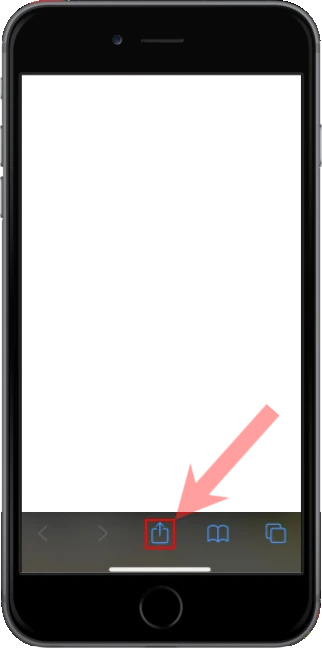

Safari toolbar with the Share button at the bottom of the screen

Step 2 of 4

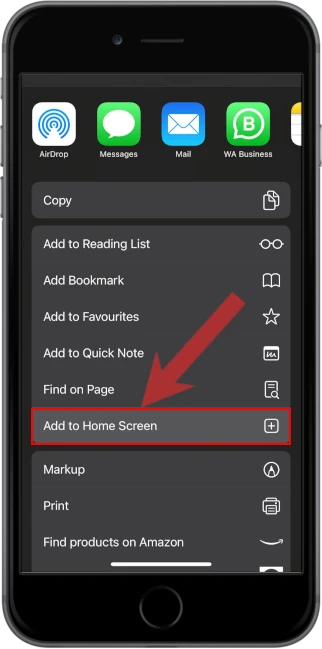
Tap Add to Home Screen

In the share sheet, scroll if needed, then tap Add to Home Screen. It is below Find on Page.

iOS share sheet with Add to Home Screen

Step 3 of 4

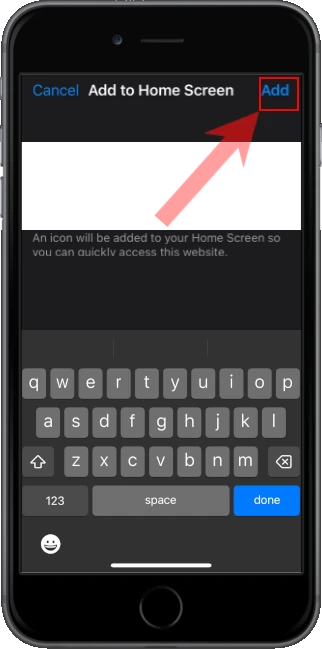
Tap Add

Check the name, then tap Add in the top right. iOS puts the icon on your Home Screen.

Add to Home Screen confirmation with Add in the corner

Step 4 of 4

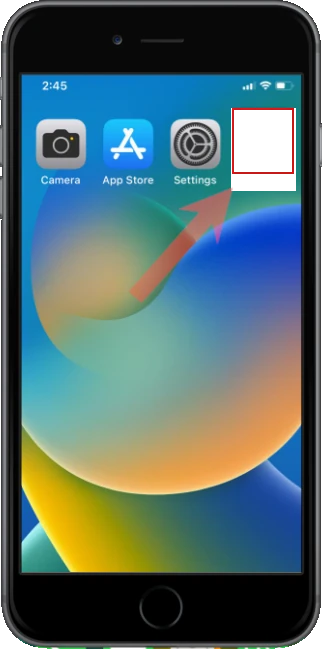
Open it from the Home Screen

Leave Safari and tap the new icon like any other app. Alerts and full-screen mode only work from that icon.

Home Screen with the installed app icon