



Loading...

BETA

Contact TTMenus

Whether you’re a restaurant owner interested in listing your business, a food lover with questions, or someone who wants to learn more about how TT Menus connects diners with great local dining, we’d love to hear from you.


Get in touch


Reach restaurants directly

Use the directory below to scroll or search our clients’ contact information — ideal for inquiries, orders, or reservations. You can also browse All Locations.


No clients found matching your search.
Add to Home Screen

Step 1 of 4

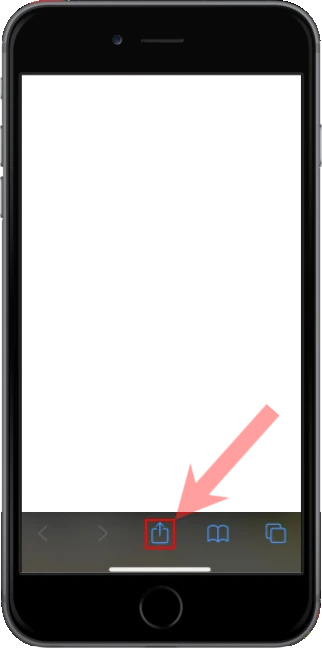
Tap Share in Safari

Open this site in Safari (not Chrome or Instagram). Tap the Share button — a square with an arrow pointing up — in the toolbar at the bottom of the screen.

Safari toolbar with the Share button at the bottom of the screen

Step 2 of 4

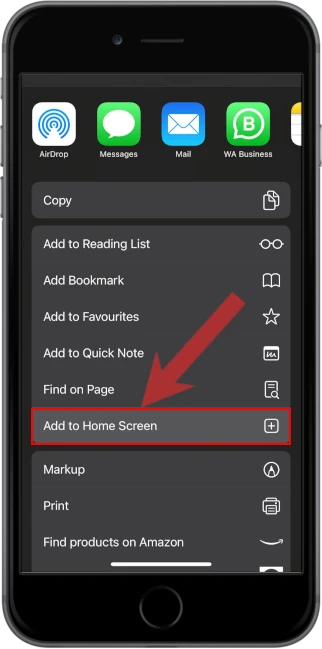
Tap Add to Home Screen

In the share sheet, scroll if needed, then tap Add to Home Screen. It is below Find on Page.

iOS share sheet with Add to Home Screen

Step 3 of 4

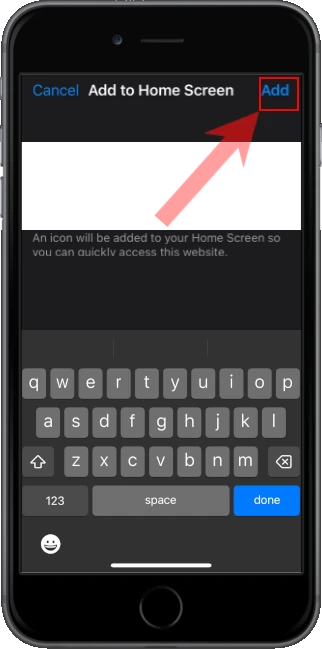
Tap Add

Check the name, then tap Add in the top right. iOS puts the icon on your Home Screen.

Add to Home Screen confirmation with Add in the corner

Step 4 of 4

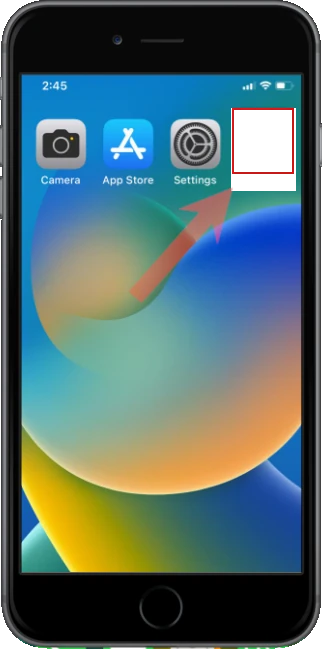
Open it from the Home Screen

Leave Safari and tap the new icon like any other app. Alerts and full-screen mode only work from that icon.

Home Screen with the installed app icon